
You will need your own free SAM.gov API key
SAM Submit searches SAM.gov with each subscriber's own SAM.gov API key, so your lookups always run on your own daily allowance. It is free with a SAM.gov account and takes about five minutes to set up.
SAM Submit features
Start with a live SAM.gov notice. SAM Submit analyzes the solicitation and its attachments, identifies the required response type, builds a tailored federal response, checks it against the solicitation requirements, assembles the response package, generates the one-page Capability Statement behind it, and tracks the pursuit in the CRM. Growth turns your goals into a practical roadmap, while Learning and its contextual assistant help your team build federal contracting skills. Import your DSBS profile once to populate everything. Create a free account to use the tools, add your own free SAM.gov API key, and subscribe for clean downloads or submission. You can also subscribe first and create your account right after payment.
32 sections on this page. Type a word to narrow them down.
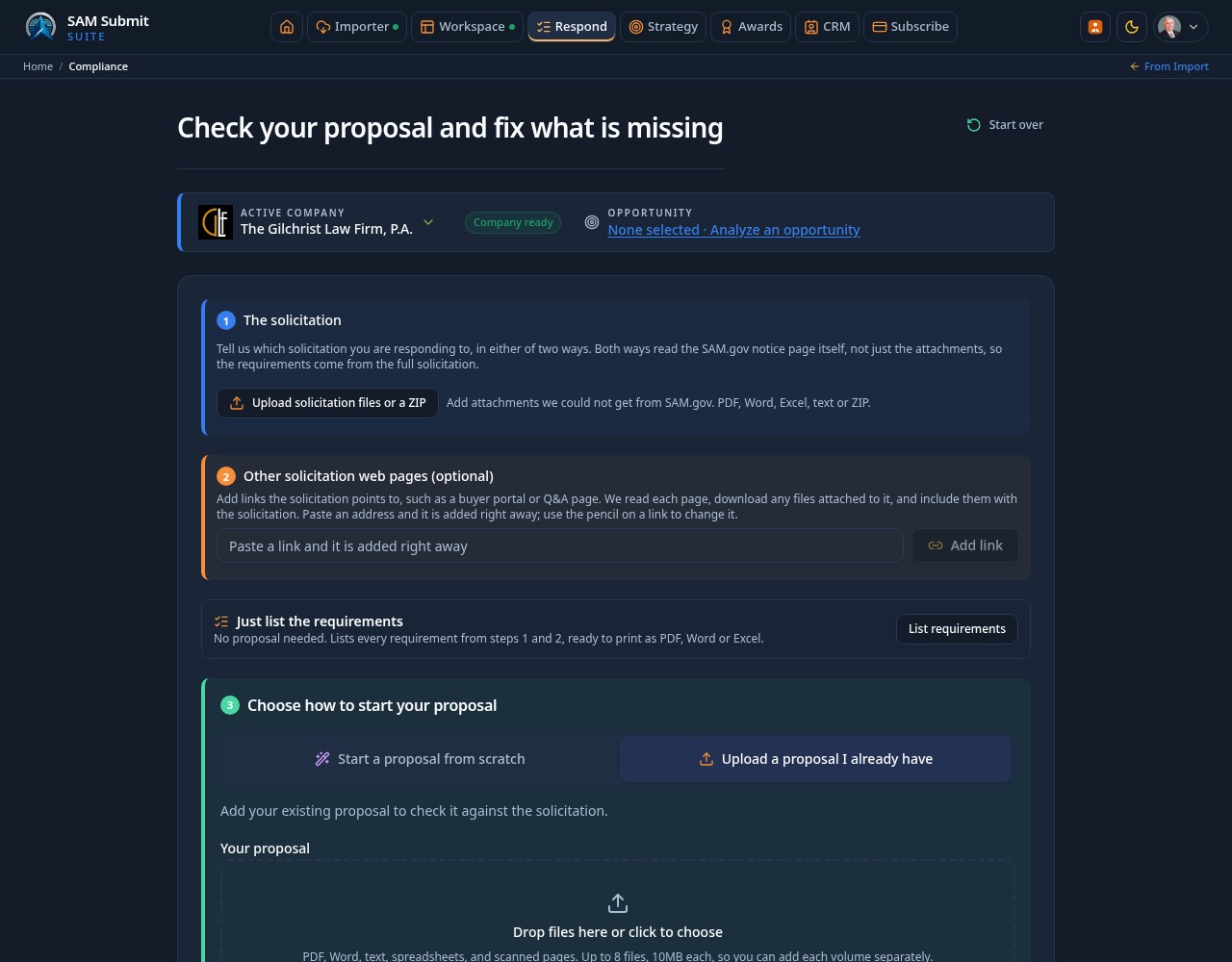
Respond: Check and Fix Your Proposal
FreeOne page takes you from the SAM.gov notice to a finished proposal in numbered steps: the solicitation, other web pages, a choice to draft from scratch or upload your proposal, wording, and what is still required.
Reads the whole solicitation
FreeEnter the Opportunity ID with your own SAM.gov API key. The notice page, description, every attachment and up to ten linked web pages are read, with file names, status and word counts shown.
Your proposal read in full
FreeUploads are read up to 1,000,000 characters per file, longer ones part by part, never silently cut. Non-Excel price tables and PDFs are read too.
Solicitation is never proof
FreeSolicitation documents are only the list of requirements, never evidence that your proposal meets them.
Work is never lost
FreeRespond keeps entries, results and uploads when you leave and return. Across the app, typed form drafts are restored on the same browser, with sensitive fields excluded and drafts cleared on sign-out.
Notify me when done
FreeTurn on a browser notice for long checks and proposal generation.
Just List the Requirements
FreeNo proposal needed: list every requirement from the solicitation in a clean, printable format.
Grouped your way
FreeGroup by section, type or source file, each marked Required or Desirable with its reference.
PDF, Word or Excel
FreeDownload or print the list in the format your team uses.
Fix All Gaps and Readiness Checklist
FreeThe app drafts wording for every gap it can and asks you only for what it cannot fill.
Fix all gaps for me
FreeDrafts wording for every Missing and Partly covered requirement, with live progress, Pause and Cancel.
Filtered results
FreeView All, Missing, Partly, Verification required, Covered or To resolve, with colored icons on every suggestion.
One item at a time
FreeRequired items appear one at a time with a running count, Back to last item, and a Show all items view.
Clear explanations
FreeEach item shows where it comes from, the requirement, what the check found and what to correct, with a link to the finding.
Check-only items
FreeConfirmations such as deadlines and SAM registration need only a check mark, and repeats are combined.
Generate, Edit and Recheck
FreeGenerate the updated proposal once required items are done, then finish it right in the document.
Edit in the document
FreeInformation still needed is highlighted in place, with check boxes and links to each spot. That list never reaches the final proposal.
Named versions
FreeSave under a name to keep versions, with the date and who saved it. Rename, reopen or delete one by one or in bulk.
Free rechecks
FreeRecheck the edited proposal against the same solicitation as often as you like without using a monthly check.
Word and PDF
SubscriptionDownload the finished proposal, with AI additions highlighted so they stay identifiable.
Revocable share links
FreeShare a saved response with a link you can turn off. Recipients must sign in.
Email Your Proposal
SubscriptionSend the completed proposal to the contracting officer with an approval record.
Contacts from the solicitation
SubscriptionRecipient names and emails are suggested from the solicitation, with CC and BCC.
Approval before sending
SubscriptionSending opens only once the proposal is complete and records who approved it and when, in Eastern Time.
Your copy, with extras
SubscriptionYou are copied automatically and receive your fixes and the compliance report, which the recipient never sees.
Bid or no bid at the end
SubscriptionThe recommendation appears only once the proposal is complete and ready to send.
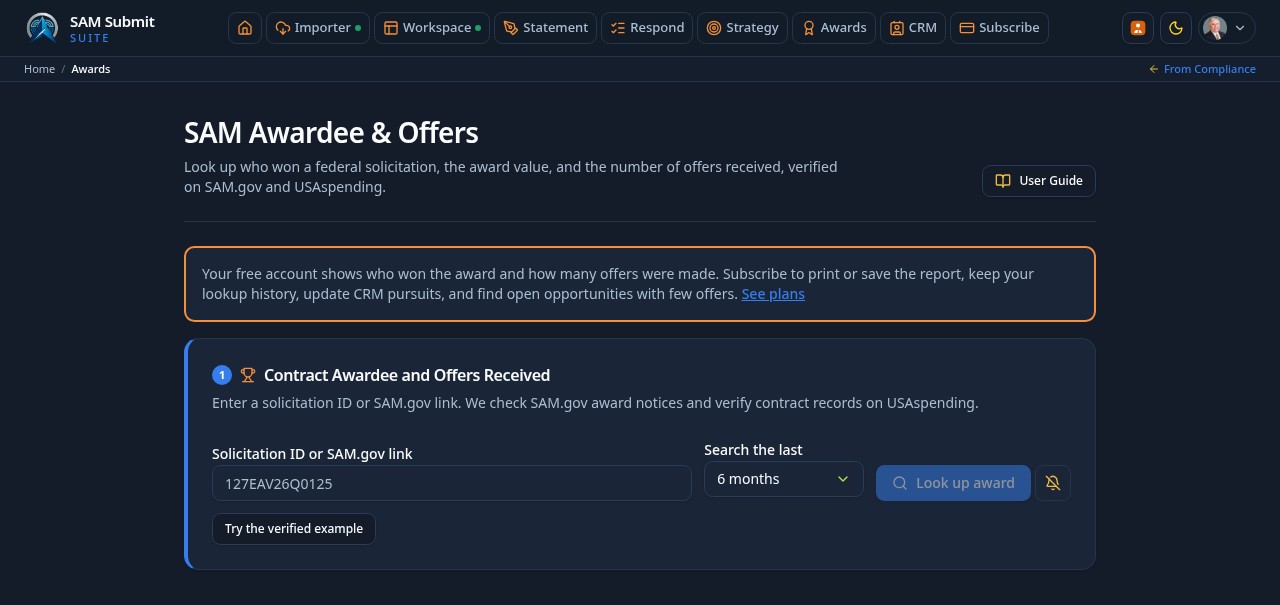
SAMAwards: Who Won and How Many Offered
FreeLook up a contract award and the number of offers received, and find open opportunities likely to draw few offers.
Awardee and offers received
FreeResults show the awardee, amount and offers, with a link to the verified USAspending record.
Few-offer opportunities
SubscriptionFilter by NAICS, PSC, department, agency, opportunity type and set-aside.
Your own SAM.gov key
FreeEvery lookup runs on your own key, with step-by-step setup instructions.
Search allowances by access level
FreeVisitors get 3 searches a day with their own browser-held key, free signed-in accounts get 10 searches a month, and paid subscribers are unlimited. Visitors cannot use AI or save results.
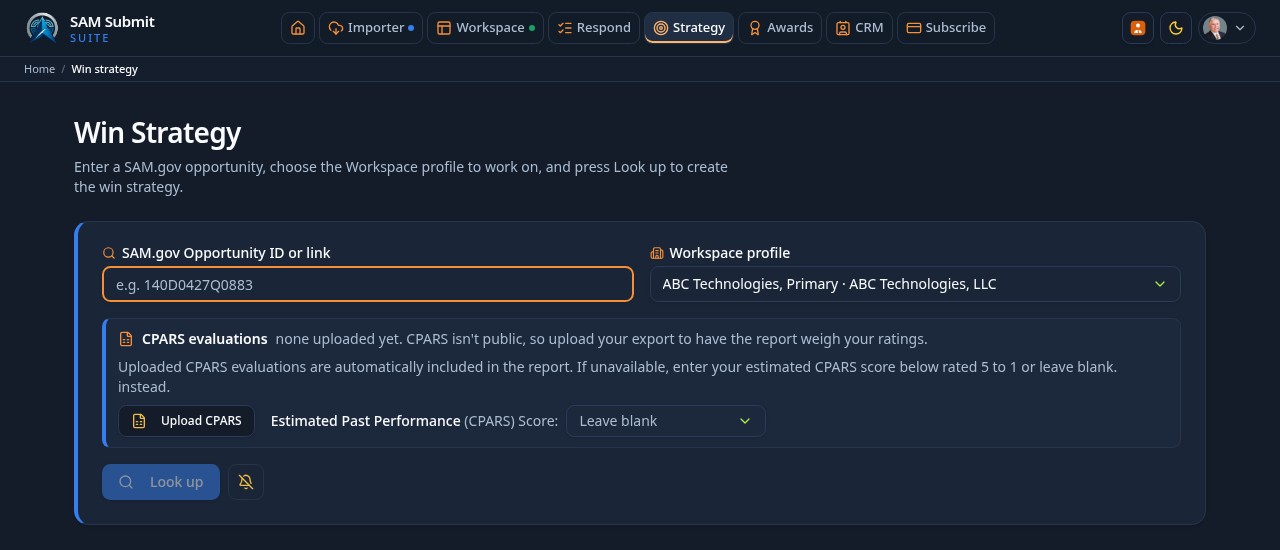
Win Strategy Reports
FreeUse a SAM.gov opportunity ID or link and the Workspace profile you choose to create an AI strategy report grounded in the solicitation, company evidence and available USAspending history.
Choose the company profile
FreeSelect the Workspace profile for this opportunity. Its capabilities and past performance are passed into the analysis.
Official CPARS or your estimate
FreeUpload an official CPARS report and its evaluations are included automatically. Otherwise choose an estimated score from Exceptional 5 to Unsatisfactory 1, or leave it blank. Uploaded evaluations and self-reported scores are alternatives, never combined; estimates are labeled as self-reported.
Detailed progress and completion bell
FreeFollow SAM.gov fetching, attachment reading, company and market award-history research, then report writing. Enable the completion bell, cancel and reset, or return after navigating within the app to continue following the run.
Evidence, charts and recommended roles
FreeRead colored headings, comparison tables and charts wherever the available numbers support them. AI assessments are distinct from published facts. The first Teaming mention links to Find teaming partners in CRM.
PDF, Word and email
FreeDownload the report as PDF or Word, or email it from the report. The page scrolls to the completed report automatically.
Monthly reports
FreeStrategy requires sign-in and your own SAM.gov API key. Free accounts receive 10 reports a month; paid subscribers have no report limit.
Admin-editable analysis command
AdminAdministrators control the Win Strategy AI command; fixed report presentation rules keep sections and tables readable independently of that command.
SAM.gov Amendment Tracking
FreeCapture amendments daily and integrate them into the response package and Compliance Check before submission.
Daily amendment checks
FreeA scheduled check monitors active solicitations for new amendments and flags them for review.
Material change detection
FreeAmendments are summarized and classified so you can tell at a glance whether due dates, requirements, or attachments changed.
Compliance blocking until acknowledged
FreeUnacknowledged amendments prevent a green Compliance Check, and selecting the warning fires a live SAM.gov check for the latest amendments on the spot.
Package integration
FreeAcknowledged amendments are added to the submission package and referenced in the response narrative.
Award watch with past performance
FreeTrack the outcome of a solicitation and pull the awardee's federal contract history from USASpending so you can study who won and why.
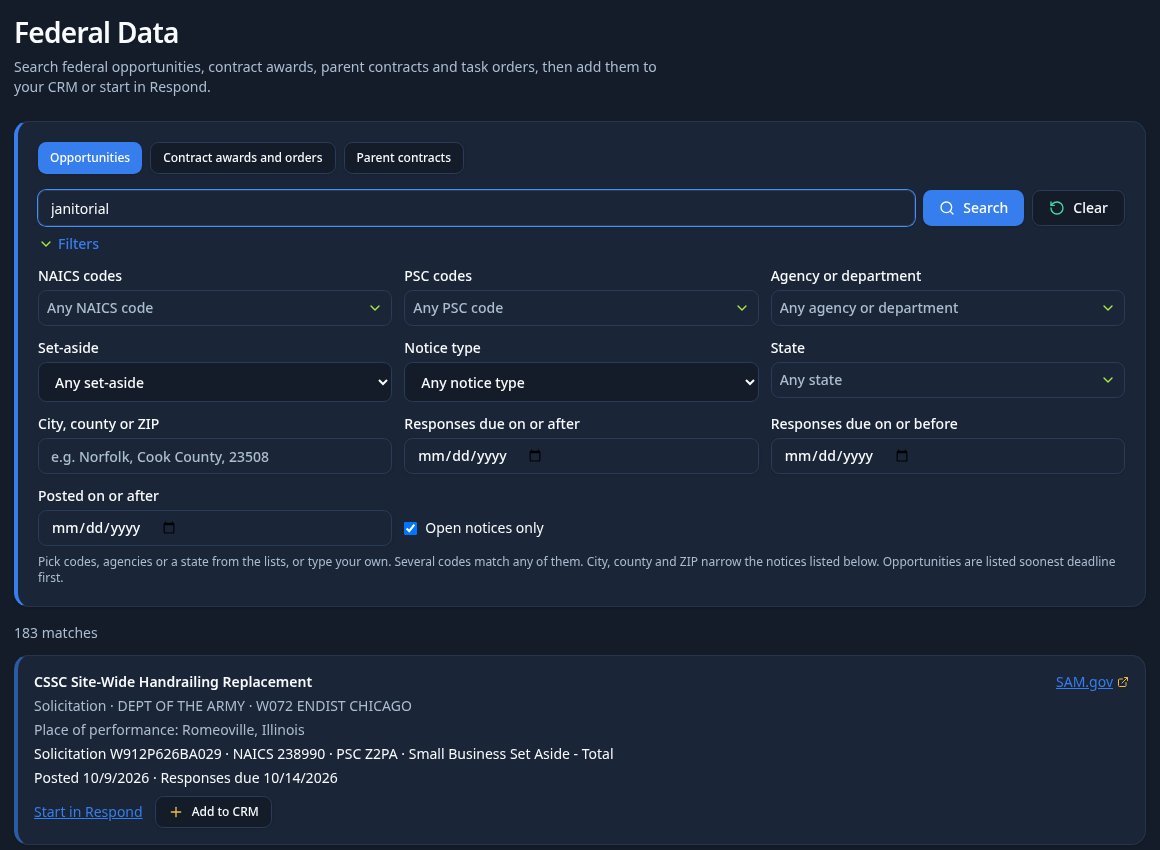
Search: Opportunities, Awards and Task Orders
FreeThe Search page finds live federal opportunities, contract awards, parent contracts and the task orders under them in one place, then sends what you find straight into your pipeline or into Respond.
Every code and agency in a searchable dropdown
FreeNAICS and PSC fields carry all 1,012 NAICS and 2,343 active PSC codes as multi-selects, and the agency field covers every department and sub-agency. Filtering starts on the first character, picked codes show as chips, and your entries stay when you leave and return.
Location filters down to city, county and ZIP
FreePick a state from the full list of states and territories, or type a city, county, ZIP or address. Places named only in the notice text are matched against each result, and every card shows its place of performance.
Open notices only means open
FreeThe switch asks for live deadlines at the source and drops any notice whose response date has passed, so the count shown is the count you can still answer.
Awards, ceilings and the orders beneath them
FreeAwards show agency, recipient, UEI, dates, obligated and total value with parent contract links. Parent contracts open their task and delivery orders, and ceilings are never counted as revenue.
Straight into your CRM
FreeAdd to CRM on a notice files it in your pipeline with agency, office, codes, set-aside and due date. On an award it copies the contract into Contracts & Orders, flags a missing parent link for review, and never creates a duplicate.
Start a response from a result
FreeSelect an opportunity and press Start in Respond to begin the response with the solicitation already filled in.
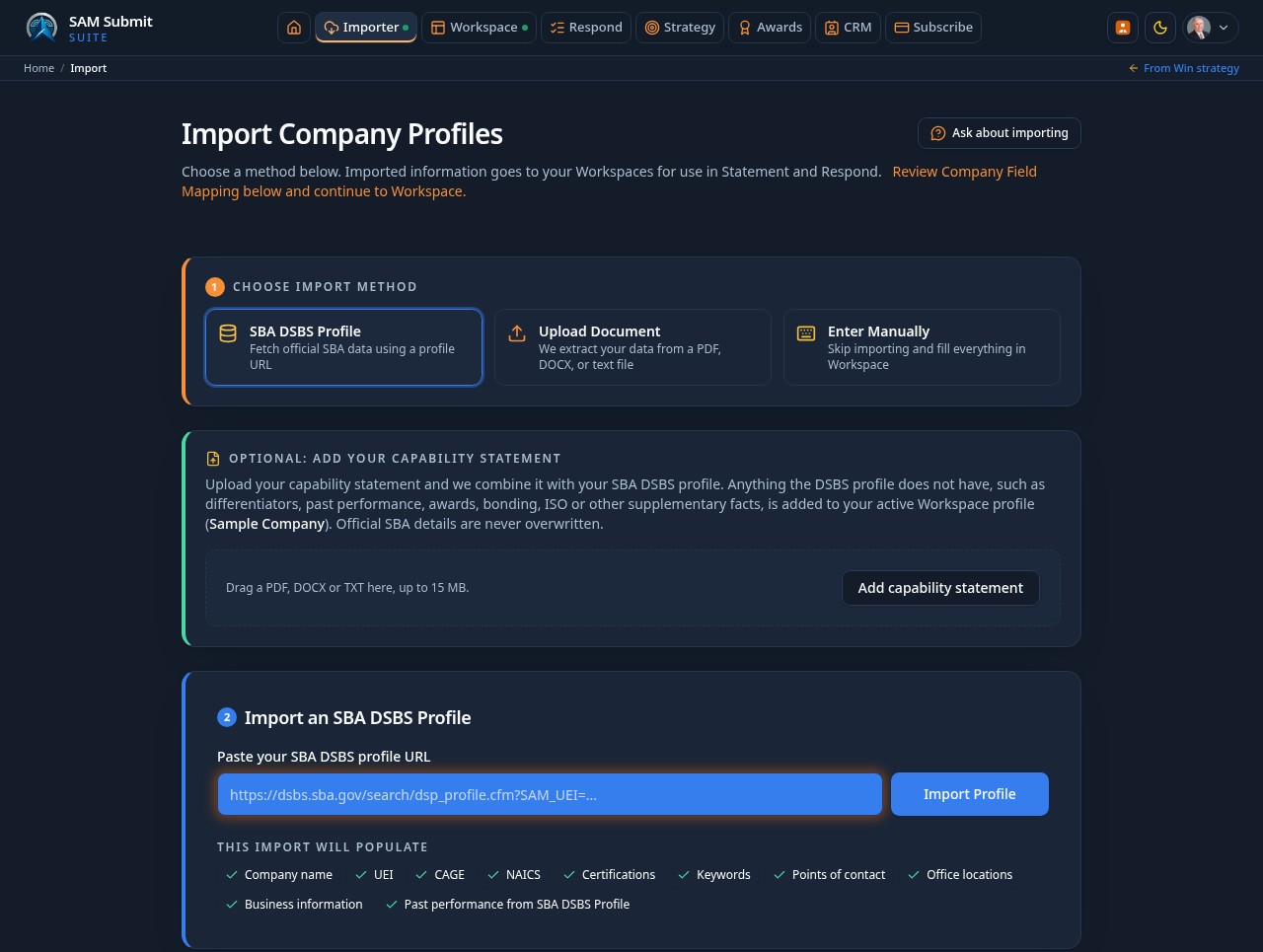
Company Data Import
FreeStop retyping your company data. Bring your official federal identity in once, live, and reuse it for every response.
Import by DSBS profile URL
FreePaste your SBA Dynamic Small Business Search profile link and your full record is fetched in seconds.
UEI and CAGE based lookup
FreeLive lookups pull current NAICS codes, certifications, contacts, and locations directly from federal sources.
Upload and parse documents
FreeDrop in an existing solicitation response, resume, or company PDF or DOCX and AI reads it into your profile fields. Every upload is saved on the page for reuse.
DSBS plus your solicitation response
FreeAdd a solicitation response beneath Choose import method to supplement your SBA DSBS profile with differentiators, past performance and supplementary facts. Official SBA details are not overwritten. The re-import notice stays collapsed and appears only for a matching previously imported company URL.
USASpending award history
FreeAutomatically fetch your real federal contract history to seed Past Performance, with UEI matching so re-imports update instead of duplicating.
CPARS Past Performance Import
FreeUpload the CPARS file you are authorized to download and turn your official evaluations into structured past performance records.
Your file, your credentials stay with CPARS
FreeYou sign in to CPARS directly and download your own report. SAM Submit never asks for Login.gov credentials, passwords, cookies, or MFA codes.
XLSX, XLS, CSV, and text PDF
FreeSpreadsheet and reliably extractable PDF reports are parsed with heading-variation recognition, normalized dates and currency, and ratings preserved verbatim.
Review before anything is saved
FreeA review step lists every detected evaluation so you select exactly which ones to import. Unsupported, empty, or unrelated files are rejected without creating blank records.
Duplicate-safe reimports
FreeEach evaluation carries a stable fingerprint, so importing an updated report updates the matching record instead of duplicating it, and never overwrites text you wrote yourself.
Provenance and AI control
FreeCPARS records show a source badge with ratings and narratives in a collapsible details view, and a per-record switch decides whether the record may feed AI drafting.
Workspace & Section Management
FreeOne organized home for Company Data, Core Capabilities, Past Performance, Differentiators, and every optional section that feeds your response.
Multi-profile support
FreeCreate, rename, delete, and switch between multiple company profiles for different lines of business.
Five focused sections
FreeCore Competencies, Differentiators, Past Performance, Contact Information, and Supplementary, with Supplementary optional.
Workspace Readiness gate
FreeA readiness audit tells you which company facts are missing before you spend AI runs on a response or design.
Auto-save on every edit
FreeChanges persist as you type with a visible saved indicator, so nothing is lost between sessions.
AI Rewrite & Revert
FreePolish your language in one click and safely undo it in one more. Rewrites are instructed to preserve your company facts, with changes available for review and revert.
Section or Rewrite All
FreeRewrite one card at a time, or run every included section in a single pass and review them together.
Fact-preserving prompts
FreePrompts are designed to carry contract numbers, figures, agencies, and certifications through verbatim and avoid unsupported claims.
Approve or revert per section
FreeAccept the rewrites you like, reject the rest, and restore any original text with one click.
Side-by-side diff view
FreeWord level highlighting shows exactly what changed before anything replaces your content.
Section Importance Control
FreeSliders that control both layout space and content depth, with saveable presets and batch changes.
Percentage allocation
FreeSet how much of the page each section earns, with values that auto-rebalance to a clean 100 percent.
100 percent controls
FreeOne-click buttons max out a section while rebalance logic keeps the rest of the sheet in bounds.
Batch slider changes
FreeAdjust several sliders at once and trigger one GPT rewrite when you are ready, instead of after every move.
Space-aware rewriting
FreeCore Competencies and Differentiators are refit by GPT when their space changes; other sections stay untouched.
Image Library & Drag-and-Drop Placement
FreeDrag, resize, and style any photo or logo directly on your live PDF preview.
Upload and categorize
FreePNG, JPG, SVG, and WebP up to 8 MB, organized as logos, project photos, or certifications.
Full placement control
FreeMove, resize, rotate, crop, set opacity and borders, and reorder layers with pixel precision.
Snapping guides
FreeAlignment guides and undo or redo make fine positioning fast and reversible.
Layout reflows around images
FreePlaced images become reserved regions, reducing text and artwork collisions.
Designer & Visual Canvas
FreeA live US Letter canvas where you set how much page each section earns and move content exactly where you want it.
Allocation sliders with GPT refitting
FreeChange the space given to Core Competencies or Differentiators and GPT rewrites that section to fit, without inventing facts.
Drag-and-drop placement
FreeMove headings, subheadings, shapes, and images anywhere on the sheet with snapping guides, layers, and undo.
Editable text boxes and lines
FreeEdit text directly, add a text box with font, size, color, weight, and alignment controls, or insert horizontal and vertical lines with adjustable color, thickness, and length.
Typography guardrails
FreeBody text stays at or above 12px. CAPABILITY STATEMENT remains the largest title at no less than 24px, while the company name stays at or below 22px.
Logo sizing from Properties
FreeSelect the logo and set its size from Properties with a slider, number control, or reset. The corner drag control is disabled so logo sizing stays deliberate and repeatable.
Template Design Studio & Template Builder
FreeA managed library of one-page templates, plus an AI builder that authors brand-new layouts from your active design rules.
Active templates are authoritative
FreeWhatever is marked active in the Studio is what the Designer loads, with a clear loading state while it applies.
Twelve structure presets
AdminPick a named architecture such as Mosaic, generate a unique template, and refine it across additional passes with cumulative instructions.
Run or revert AI rules
FreeApply the rules library to any template on demand and roll back to the version you had before.
Locking, versioning, and trash
FreeLock templates against accidental edits, save under the same name to create a new version, and restore deleted templates from trash.
PDF Preview, Print & Generation
SubscriptionA US Letter preview designed to closely match the generated PDF. Previewing is free.
Strict one-page enforcement
FreeContent is condensed intelligently rather than shrinking type below readable size, with a 12px body floor and tight section flow that avoids unused blank space.
Two download engines
SubscriptionUse the hosted renderer for a shareable file, or print straight from the browser to Save as PDF when the hosted engine is switched off.
Professional templates
FreeEditorial, Executive, Modern Infographic, Beacon, Prism, and more, each structurally distinct even in grayscale.
Unlimited paid downloads
SubscriptionEvery paid plan includes unlimited Solicitation Responses, proposal responses and downloads, with no monthly PDF caps or extra download packs.
Saved Versions & Templates
FreeNamed versions let you return to earlier saved work.
Named snapshots with notes
FreeGive each autosave or manual save a name and note so the right restore point is easy to find.
Branch per opportunity
FreeFork a version for a specific solicitation while your base design stays untouched.
Version lineage
FreeParent, timestamp, solicitation, and author are tracked on every save.
Proposal version diffs
FreeCompare solicitation response drafts side by side with word-level highlighting, then revert to any earlier version.
Integrated CRM
FreeA relationship layer that builds itself from the work you are already doing, including SAM.gov prospecting and vendor research, with no duplicate data entry.
Auto-derived records
FreeAgencies, contacts, opportunities, and vendors are created from your saved solicitation analyses, response documents, and vendor research.
Pipeline and metrics
FreeSee open pursuits, submitted responses, saved vendors, and recent activity in one dashboard.
SAM.gov prospecting
FreeOpportunity Search lives on the Search page in the main menu. It accepts keywords, SAM solicitation IDs, Notice IDs and SAM.gov links, and filters live federal notices by notice type, set-aside, NAICS, PSC, agency, place of performance, due date window, and how recently the notice was posted, with a Clear button that resets everything at once. Tick the notices you want and add them to the pipeline here.
NAICS and PSC code pickers
FreeBrowse the full official NAICS and PSC lists by code number or by plain description and add codes to the search with one click.
Pick what enters the pipeline
FreeResults arrive with a tick box on every notice plus Select all and Select none, so only the opportunities and contacts you choose are added to the CRM.
Saved searches and email reports
FreeSave, rerun, duplicate, rename or delete a search. Schedule emails daily, every 2 or 3 days, or weekly at your chosen Eastern Time, with new or changed notices or all results, and Send now. Select a result and start it in Respond.
Vendor Search on the Search page
FreeVendor Search sits next to Opportunity Search on the Search page. Search public SAM.gov and SBA registrations, review published contacts, awards, and exclusions, save vendors into your pipeline, and score fit against any opportunity.
Updates on its own
FreeThe CRM refreshes from your statements, responses, analyses, and saved vendor records automatically, with no sync button to press.
Company scoped
FreeRecords belong to your company account, so teammates see the same pipeline and vendor list.
Vendor Search & Teaming
FreeFind and evaluate federal vendors, teaming partners, subcontractors, and competitors using public SAM.gov, SBA, and USASpending data on the Search page.
Search public federal registrations
FreeLook up companies by name, UEI, CAGE, NAICS, PSC, capability keyword, city, or state. Filters for small business status, socioeconomic certification, federal award history, and exclusion status refine the results.
Published contacts first
FreeResults lead with publicly published contact name, email, telephone, and position, followed by location, UEI, CAGE, primary NAICS, business status, and federal awards. Missing data is labeled, never invented.
Save and categorize vendors
FreeSave any vendor to the CRM and set the relationship: potential prime, potential subcontractor, teaming partner, competitor, or other. Saved vendors are scoped to your organization.
Evaluate fit against an opportunity
FreeScore a vendor against a CRM opportunity by comparing NAICS, PSC, certifications, location, and past performance, with an explanation of the fit.
Find teaming partners automatically
FreeFor any opportunity, rank active SAM registrants against the notice's NAICS, PSC, state, set-aside, agency, and place of performance, excluding your own company, and get a scored shortlist.
Draft outreach without inventing facts
FreeGenerate an outreach email draft that references your company strengths and the opportunity, while never fabricating contact details or awards. Review and send from your own email client.
External CRM Sync
SubscriptionConnect HubSpot, Salesforce, Zoho CRM, or Microsoft 365 so pursuit records and response status can sync with your existing workflow.
Per-user token credentials
SubscriptionEach user pastes their own private app token or refresh token; credentials are encrypted server-side and never returned to the browser.
Setup instructions built in
FreeStep-by-step guides for creating private apps, connected apps, and Microsoft app registrations are shown inside the CRM settings card.
Stage mapping
SubscriptionMap SAM Submit pursuit stages to your CRM pipeline so opportunities advance as the response moves through Draft, Review, Compliance, Package, and Submitted.
Webhook fallback
SubscriptionA signed webhook sends normalized events to any other system when a native connector is not available.
Subscription & Payment
SubscriptionSign in with a free account to use the tools and add your own free SAM.gov API key for lookups; clean downloads and submission require an eligible paid plan. Billing lives at the company level.
Essential, Professional, and Enterprise plans
Subscription$150 for 1 user, $250 for up to 5 users, and $390 for up to 15 users per month. Every paid plan includes unlimited Solicitation Responses and Downloads.
Company-level entitlement
SubscriptionThe subscription belongs to the company, so every user on the account inherits download and submission access.
Billing portal
SubscriptionUpdate payment methods, view invoices, and cancel from your account at any time.
Grace period
SubscriptionA short window after cancellation or a failed payment lets you finish work in progress.
Unlimited paid usage
SubscriptionPaid plans have no usage limits on Solicitation Responses, Solicitation Responses, or Downloads, so no extra download credits are needed. Security and anti-abuse safeguards still apply.
Add users to any plan
SubscriptionAdd users at $35 each per month, at checkout or later on an existing account. The charge appears as its own line on the payment page, and the workspace allowance rises as soon as it is paid.
Subscribe before you set up
SubscriptionCheckout comes first: pay as a visitor, then finish creating the account with the email you paid from. The benefits shared by every plan are listed once below the three plan cards, and the same list appears on the payment page.
Account & Access Management
FreeVerified business identities, clear roles, and usage visibility for tracked downloads, proposals, and AI activity.
Business email enforcement
FreeEmail verification with configurable domain rules keeps free consumer addresses out of your tenant.
Roles and permissions
FreeYour Account page shows which organization you belong to, your access level, and whether you are its Primary Admin, kept separate from platform administration.
Clear monthly allowances
FreeFree accounts can look around: browse every page, save work, and use CRM and workspace basics. AI tools and SAM.gov lookups need a paid plan or a trial invitation. Paid subscribers are unlimited.
Free rechecks and same-notice redrafts
FreeFirst drafts use the proposal allowance. Rechecks and redrafts for the same notice are free. Paid subscriptions remove usage caps and include downloads and emailed submissions.
Admin Controls & Data Persistence
AdminPlatform administrators tune generation rules, pricing, integrations, libraries, and audit history without touching code.
Prepare a client workspace and invitation
AdminBring in company information through DSBS, a document or manual entry. Enter the client name and email, choose ownership and the unlimited-access period, and include your personal invitation message.
Edit, resend and track invitations
AdminOn a client card, edit the pending recipient name, email and message, save, then resend to email the updated details. The card shows the latest resend date, recipient and repeat-send count. Extend or remove the client's access from the same card.
Rules Library management
AdminEdit PDF, GPT, AI design, and Template Builder rules with conflict resolution and an exportable prompt payload.
Reference library and sources
AdminUpload reference solicitation responses and decide whether GPT draws on them, on web search, or on specific URLs.
Integrations, pricing, and paywalls
AdminConfigure SAM.gov, USASpending, GPT, APITemplate, Formspree, and Stripe, manage free and visitor allowances, and choose whether printing sits behind the paywall.
Database library and audit logging
AdminBulk manage and lock stored templates, and review every download and AI run with timestamps and token amounts.
Machine Learning That Improves With Use
FreeThe platform learns from real pursuit outcomes. Win Strategy recommendations, tailoring suggestions, and compliance findings become training data, so the guidance you see gets sharper the more the system is used.
Every analysis becomes training data
FreeWin Strategy snapshots, tailoring decisions, and compliance results are captured with a completeness score. Only records rich enough to teach from are admitted into a training dataset; thin records are held out with the reason shown.
Outcome tracking closes the loop
FreeWhen you submit a response and later record whether you won, lost, or were shortlisted, that outcome is joined back to the original prediction. This is what turns one-off guesses into measurable accuracy.
Models trained inside the platform
FreeWin probability, recommendation, and section-preference models are trained on versioned datasets with time-aware splits, so a model is always measured against work that happened after its training window, never against data it memorized.
Explanations with every prediction
FreeEach ML-assisted score ships with a confidence level and a per-feature explanation showing which signals pushed the result up or down. Nothing arrives as an unexplained number.
Safe fallback to the rules engine
FreeIf no promoted model exists, or a model underperforms its baseline, predictions fall back to the deterministic rules engine automatically and the prediction is flagged as a fallback. The ML layer augments the evidence-backed engine; it never replaces it silently.
Admin Machine Learning console
AdminThe ML Control Center shows registered use cases, the system map, collection and prediction activity, data quality, readiness, models, runs, drift, explanations, feedback, tests, settings, and audit logs in one governed view.
Collect-only by default
AdminGrowth learning starts in collect-only mode. Shadow and assisted modes remain guarded until their readiness thresholds pass, and deterministic rules continue to win whenever a hard rule applies.
Organization Workspace, Invitations & Access Levels
FreeEach company gets one private workspace that owns its data. Colleagues join by invitation only, and what each person may do is controlled by their access level.
One private workspace per company
FreeThe first person to sign up from your business domain creates the workspace and becomes its Primary Admin. Company profile, opportunities, responses, saved packages, and generated files belong to the organization, not to one person's login.
Invitation only, even on your own domain
FreeSharing an email domain grants nothing. A second person from the same company is told to ask their administrator for an invitation, and each invitation is a single-use link tied to that one address.
Five access levels
FreeView only, statement downloads, proposal downloads, edit, and organization administrator. Every level is explained in plain language in the invite dialog, and changes take effect immediately.
Primary Admin transfer and safe removal
FreeAdmin rights can be handed to another member with a confirmation step, and the workspace can never be left without an administrator or have its last one removed by accident.
Strict separation between organizations
FreeLists, searches, counts, downloads, and stored files are all checked against your membership on the server, so nothing from another company is ever reachable, and removing a member revokes their access straight away.
Shared plan, per-person activity log
FreeThe subscription and allowances belong to the organization, while every download, AI run, invitation, role change, and removal is recorded against the person who did it.
System Health, Alerts & Usage Limits
AdminA live health picture of the whole platform, with automatic alerts, operational monitoring and access-aware usage controls.
Live monitoring dashboard
AdminMembers, AI calls, failures, spend, tokens, generations, uploads, and package sends over the last 24 hours, refreshed every minute.
Automatic alerts, emailed when critical
AdminCrossing a threshold raises an alert with a Resolve button, and critical alerts are emailed to every platform administrator.
Access-aware safeguards
AdminMonitor heavy operations and configure eligible free-account or visitor allowances. Paid subscribers have no usage caps; security and anti-abuse safeguards still apply.
Every threshold editable in Admin
AdminLimits and alert thresholds are changed from the Usage Limits tab with no code change, while paid usage always remains unlimited.
Growth Roadmap, Opportunities & Connections
FreeTurn your company goals and Workspace evidence into an organization-wide federal growth plan with prioritized actions, matched opportunities, and useful relationships.
Set practical growth goals
FreeRecord target agencies, industries, contract values, geographic focus, planning horizon, and pursuit posture so recommendations reflect where your company is trying to go.
Evidence-backed Roadmap
FreeRoadmap actions explain why they matter, show the Workspace or public evidence behind them, preserve unknowns, and can be completed, dismissed, or added to CRM tasks.
Opportunity matching
FreeNotices found through Opportunity Search are scored against your goals and company profile, with strengths, concerns, unknowns, and links back to SAM.gov.
Connections use the same CRM records
FreePotential partners and relationship actions come from Vendor Search and the CRM, so Growth never creates a disconnected contact list.
Learning & Federal Training
FreeLearn federal contracting in the same platform where you pursue the work, with internal courses, approved external training, personalized ordering, progress, and team oversight.
Courses, checks, and certificates
FreeEnroll in published courses, work through lessons, complete server-graded knowledge checks, track progress, and receive a versioned certificate when course requirements are met.
Personalized For you view
FreeLearning uses your company profile, industry, role, experience, and goals to reorder useful training. The full catalog remains available and nothing is hidden.
Approved external training
FreeBrowse administrator-approved courses from outside providers by topic, provider, cost, format, and availability. Open the provider page, save a course, or self-report completion without copied course content.
Federal updates and team assignments
FreeSource-backed update briefings identify confirmed changes, while organization administrators can assign training and review team progress.
SAM Submit AI Learning Assistant
FreeAsk questions in a right-side panel that understands the lesson or Learning screen in front of you and answers from approved training and official sources.
Context and sources travel together
FreeThe assistant receives the current Learning context, cites the sources behind grounded answers, and says when the approved material does not support an answer.
Type or speak your question
FreeRecord a question, review and edit the transcript before sending it, or type normally. Audio is never recorded continuously.
Listen, simplify, and practice
FreeRead an answer aloud, ask for a simpler explanation, generate practice questions, and see related training without leaving the page.
Private, metered, and feedback-aware
FreeThe assistant requires sign-in, uses centralized AI allowances, keeps conversations organization-scoped, and records helpful or not helpful feedback for quality monitoring.
Ask SAM on Every Page
FreeA page-aware assistant sits beside Back to Top on every screen and answers questions about what you are looking at.
It knows the page and your work
FreeAsk about the current page, your company and user data, past performance, saved documents, or the solicitation you have loaded, and the answer uses that context.
Searches the web when needed
FreeWhen the answer is not in your workspace, the assistant searches the internet and cites its sources, and says when it could not verify something.
Allowances by plan
FreeFree accounts get 50 assistant questions a month; paid subscribers are unlimited.
Keep the conversation
FreeDownload the conversation when you want to share the answer or keep it with your proposal work.
Common questions
Free previews, subscriptions, and admin setup
Ready when your next solicitation drops
Create a free account to use the tools and add your own free SAM.gov API key, then subscribe for clean downloads or response submission.